Hotbar Slot Button
Hotbar Slot Button is a quality-of-life texture pack for Minecraft Bedrock / MCPE that adds a row of on-screen buttons mapped directly to your hotbar slots. It’s designed for players who struggle to reach the default hotbar on touch devices or want faster access to items during PvP, mining, or clutch situations.
Instead of stretching your thumb to the bottom of the screen and risking mis-taps, you get clean, tappable buttons that instantly switch to the corresponding hotbar slot — for example, Button 1 selects Slot 1, Button 2 selects Slot 2, and so on. The buttons also work with 2‑finger mode, which means you can keep one finger on the screen for movement or breaking blocks while tapping a hotbar button with the other to swap tools or weapons without interrupting your action.
---
Key Features
🎯 On-Screen Hotbar Buttons
Adds a dedicated set of buttons that mirror your hotbar slots, making it easier to switch items on touch devices.
🕹️ PvP & Survival Friendly
Ideal for PvP, clutch plays, and fast tool switching. You can swap between swords, blocks, and pearls without lifting your movement finger.
✌️ 2-Finger Mode Support
Fully supports 2‑finger playstyles. For example, you can keep mining with a pickaxe while quickly tapping a button to swap to a shovel or torch mid-action.
🎛️ Customizable Layout
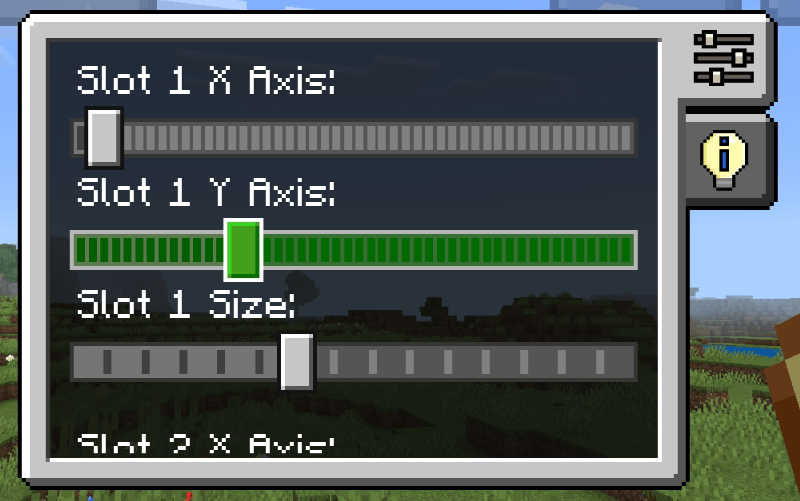
The position and size of the buttons can be customized via an editor panel. Press the gear icon at the bottom-right of the screen to open the editor, then use sliders to move and resize the buttons to match your hand position and device.
⚙️ Editor Panel Integration
A built-in editor UI makes it easy to fine-tune the HUD without manually editing config files every time.
---
Configuration Notes
The pack uses Minecraft’s JSON UI system, which currently does not permanently store custom positions and sizes edited in‑game. After adjusting your layout:
The editor displays your configuration as JSON code in a text box.
To make your changes persistent, you must manually copy that code and replace the corresponding values in the _global_variables.json file inside the pack.
This workaround allows you to lock in a personalized button layout that fits your exact grip and device, without having to reconfigure the HUD every time you play.
> ⚠️ Warning: Due to JSON UI limitations, any changes made only in-game will be reset when the pack reloads. Always back up your custom _global_variables.json if you plan to update or modify the pack.