BetterMap Mod
Hytale BetterMap Plugin
Enhance your world exploration with saved map data, customizable zoom, waypoints, shared mapping, and performance-optimized rendering.
What is this?
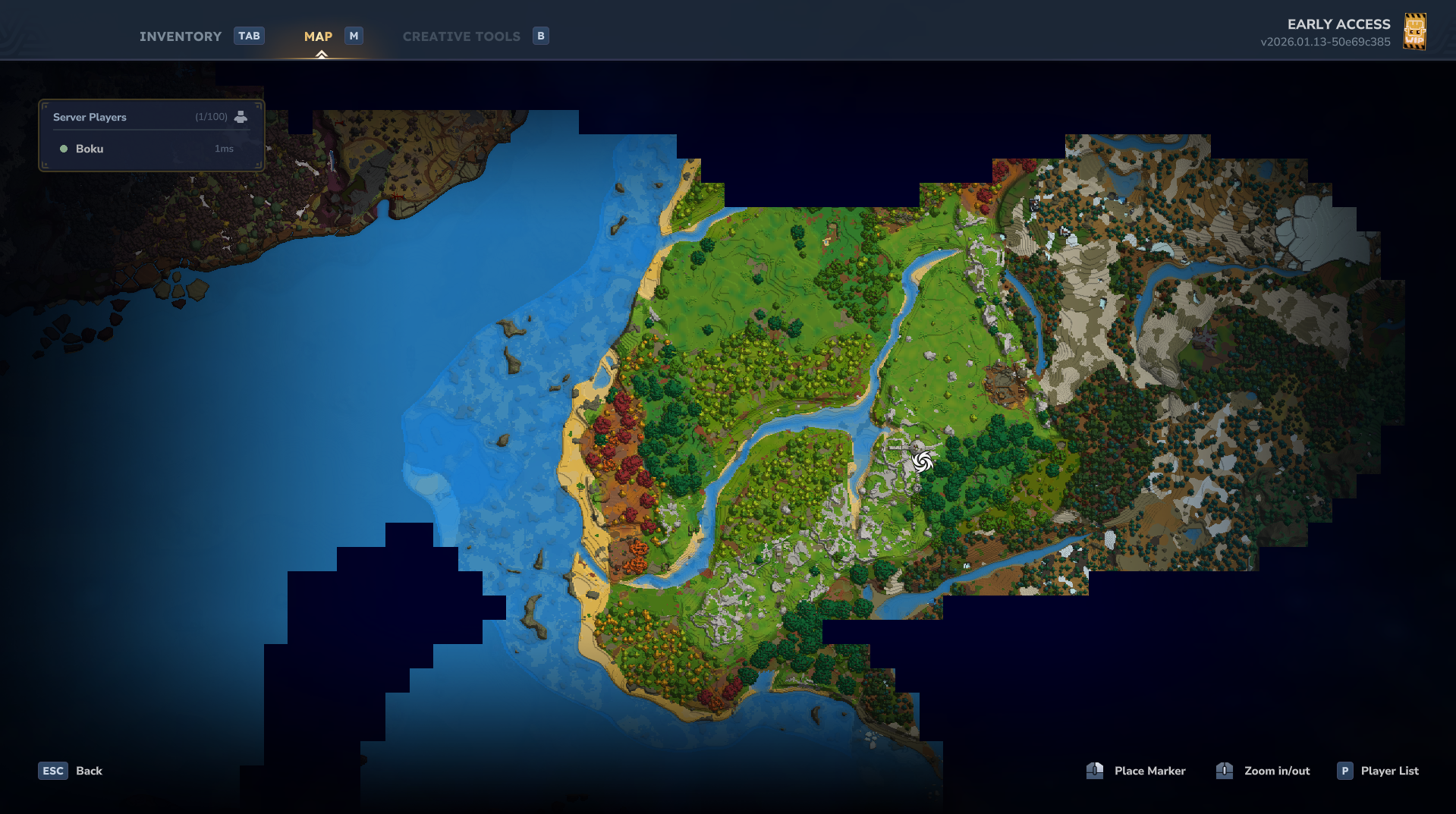
By default, the Hytale in-game map is fleeting. It only displays a small circular area around the player, and as soon as you walk away, the map "forgets" where you have been.
Hytale BetterMap changes this. This server plugin introduces a saved exploration feature. As you travel through the world, the plugin records the areas you have visited, effectively removing the "fog of war" permanently. Your map grows bigger the more you explore, allowing you to retrace your steps and navigate with ease.
Key Features
Persistent Exploration: The map retains all previously visited areas across sessions. Data is saved automatically to prevent loss during server crashes.
Waypoint System: Never lose a location again. Open the waypoint menu to add markers at your current position, customize their names and colors, and share them with other players.
(Note: Global shared waypoints are now back in v1.2.3)
Teleport: Players with permission can teleport directly to their saved waypoints.
Linked Exploration (Shared Map): Optionally enable a shared map mode where all players contribute to a single global map, allowing you to see areas discovered by friends in real-time.
Compass Radar: Easily locate other players nearby directly on your compass. The range can be customized or toggled off by admins.
Location Overlay: Display your current coordinates and direction on-screen via a toggleable HUD (/bm location). (Temporarily disabled for compatibility fixes)
Customizable Zoom: You are no longer locked to the default zoom. Set your own Minimum (zoom out) and Maximum (zoom in) scales. Settings are saved per player.
Multi-World Support: Whitelist specific worlds for the mod to track, resolving compatibility issues with server hosts (like Apex) that change default world names.
Performance & Optimization
Dynamic Chunk Loading: The plugin intelligently manages memory by loading only the explored chunks nearest to the player and unloading distant ones.
Map Quality Settings: Admins can balance visual fidelity and performance by choosing between LOW, MEDIUM, or HIGH quality.
LOW: Loads up to 30,000 chunks (8x8 resolution).
MEDIUM: Loads up to 10,000 chunks (16x16 resolution).
HIGH: Loads up to 3,000 chunks (32x32 resolution).
Note: High quality strictly limits loaded chunks to prevent memory errors.
You can also manually set the maximum number of loaded chunks via /bm config maxchunk, within recommended limits.
Commands & Permissions
The command system has been updated. Basic features are now available to all players by default, while configuration commands require specific permissions.
You can either do /op add <player> to give full access or assign specific permissions as needed using /perm group add Adventure <permission>.
Public Commands (No Permission Required)
/bettermap (or /bm)
Displays current map settings and status.
/bm waypoint menu or /waypoint or /wp
Opens the Waypoint UI to manage, share, or delete waypoints.
/bm min <value>
Sets your personal minimum zoom scale (default base is 32).
/bm max <value>
Sets your personal maximum zoom scale (default base is 256).
Global Waypoints
Permission: dev.ninesliced.bettermap.command.waypoint.global
Allows the user to create, view, and manage global (shared) waypoints visible to all players.
Teleportation
Permission: dev.ninesliced.bettermap.command.teleport
Waypoint Teleport: Allows the user to teleport to locations via the Waypoint UI buttons.
Admin & Configuration Commands
Permission: dev.ninesliced.bettermap.command.config
/bm config radar <range>
Sets the radar range (use -1 for infinite).
/bm config location
Toggles the server-wide default for the location HUD.
/bm config hideplayers
Hides player cursors on the map.
/bm config hidewarps
Hides other players' warps on the map.
/bm config hideunexploredwarps
Hides warps in unexplored regions.
/bm config hidepois
Hides all POI markers on the map.
/bm config hideunexploredpoi
Hides POIs in unexplored regions.
/bm config waypointteleport
Toggles the ability to teleport to waypoints.
/bm config markerteleport
Toggles the ability to teleport to map markers.
/bm config shareallexploration
Toggles "Linked Map" mode (shared exploration data).
/bm config track / untrack
Adds or removes the current world from the active whitelist.
/bm config maxchunk <number>
Manually overrides the maximum number of loaded chunks.
/bm config autosave <minutes>
Sets the interval for auto-saving map data.
Reload Command
Permission: dev.ninesliced.bettermap.command.reload
/bm reload
Reloads the configuration file immediately.
Configuration & Data Storage
All plugin files are located within the server's mods directory.
Configuration File
You can modify the plugin settings in mods/bettermap/config.json.
Note: Changing mapQuality or maxChunksToLoad requires a server restart to take effect.
Default Configuration:
{
"explorationRadius": 16,
"updateRateMs": 500,
"mapQuality": "MEDIUM",
"minScale": 10.0,
"maxScale": 256.0,
"debug": false,
"locationEnabled": true,
"shareAllExploration": false,
"maxChunksToLoad": 10000,
"radarEnabled": true,
"radarRange": -1,
"hidePlayersOnMap": false,
"hideOtherWarpsOnMap": false,
"hideUnexploredWarpsOnMap": true,
"allowWaypointTeleports": true,
"allowMapMarkerTeleports": true,
"hideAllPoiOnMap": false,
"hideUnexploredPoiOnMap": true,
"hiddenPoiNames": [],
"autoSaveInterval": 5,
"allowedWorlds": [
"default",
"world"
]
}
Saved Exploration Data
Map data is saved per world. You can find the saved exploration files here: mods/bettermap/data/
Examples:
Waypoint list using command /bettermap waypoint menu: